Search Console should be used as a prioritization system, not as proof that a new site will rank quickly.
Use Google Search Console to Prioritize AI Tool Pages
A practical decision framework for deciding which AI tool profiles, comparisons, and guides deserve more hands-on testing after a new directory site is submitted to Google.
Updated: 2026-06-17
For a young AI tool directory, the first useful signals are sitemap discovery, page indexing status, impressions by page, queries, and early click-through patterns.
The safest content expansion path is to upgrade pages that already show search demand before publishing many thin tool profiles.
Recommended workflow
- Confirm the sitemap is successful and the submitted URLs match the production domain.
- Check Page indexing to separate technical crawl problems from normal early-stage discovery delays.
- Use the Performance report only after there is enough data to compare pages and queries.
- Sort candidate pages into expand, improve title, keep noindex, or defer buckets.
- Add first-hand screenshots, setup notes, pricing checks, and verdicts only to the pages that justify the work.
- Recheck the same report every 7 to 14 days instead of reacting to daily noise.
1. Start with indexability, not traffic
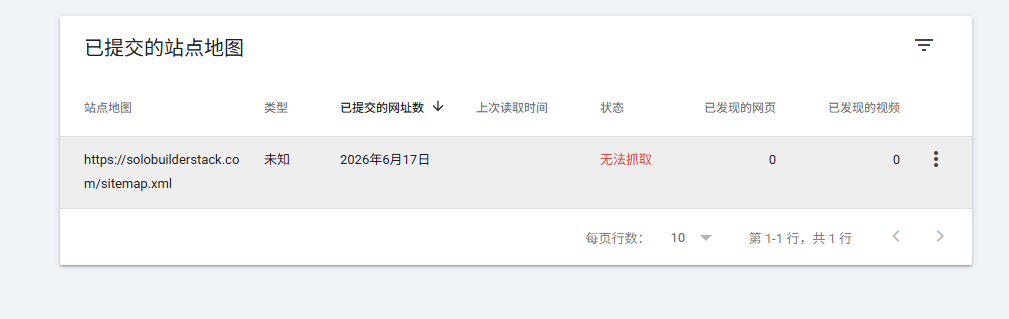
A new directory should first answer a simple question: can Google discover and evaluate the pages that are worth indexing? In this project, the sitemap submission succeeded and Google discovered the initial URLs. That is a technical baseline, not a ranking result.
The Page indexing report is the first place to look after sitemap submission. It shows the indexing status of URLs Google knows about in the property. For this site, the important split is intentional: source-checked pages are indexable, while incomplete tool profiles remain noindex until they have enough evidence.
- If a source-checked page is not indexed, inspect the URL and check robots, noindex, canonical, redirect, and server response.
- If an incomplete tool page is noindex, leave it alone until it has official sources and hands-on notes.
- Do not treat every excluded URL as a problem. Some exclusions are deliberate editorial control.
2. Wait for enough Performance data before making content decisions
Search Console performance data becomes useful when pages have impressions and query history. Google defines Search Console impressions, clicks, and position inside the Performance reports, but early data on a brand-new site can be sparse or delayed.
A good first review window is 7 to 14 days after sitemap submission, then a stronger review at 28 days. The goal is not to celebrate a single impression. The goal is to find repeated signals: which pages appear, which queries trigger them, and whether the page title seems aligned with the search intent.
- Impressions without clicks can still be useful because they reveal query demand.
- Clicks with poor engagement should lead to content and expectation checks, not automatic monetization.
- Average position should be read cautiously because one page can appear for many different queries.
3. Use four buckets for page decisions
Instead of asking whether a page is good or bad, put every candidate page into a decision bucket. This keeps content work tied to evidence and prevents the site from becoming a large pile of generic AI-generated pages.
The first bucket is expand. These are pages that are indexed, have impressions, and match queries where the page can realistically become more useful with screenshots, test notes, comparisons, or clearer verdicts. The second bucket is improve title or angle. These pages have impressions but weak click behavior or mismatched queries. The third bucket is keep noindex. These are tool profiles with too little evidence. The fourth bucket is defer, for topics that may matter later but show no signal yet.
- Expand: indexed page, relevant impressions, clear user intent, and room for original evidence.
- Improve: impressions exist, but the title, intro, or comparison angle may not match the query.
- Keep noindex: tool page lacks source checks, screenshots, or a tested verdict.
- Defer: no impressions, low business value, or too much testing effort for the current stage.
4. Decide which AI tool pages to upgrade first
For this site, the first upgrade candidates should be pages connected to the real build workflow: Google Search Console, Cloudflare Pages, GitHub-based deployment, domain setup, and canonical redirects. These topics have actual project evidence and can be explained with screenshots from the deployment process.
The second tier should be commercial or high-intent pages such as Next.js, Netlify, AdSense, and affiliate programs. These need current official-source checks before they are indexed as recommendation pages. The final tier is broad AI app-builder coverage such as Bolt.new, Lovable, v0, Cline, Continue, OpenHands, and Open WebUI. Those pages should stay thin or noindex until each has a hands-on test record.
- Upgrade pages where we have already done the workflow ourselves.
- Avoid publishing buyer recommendations before checking current pricing and terms.
- Use screenshots as evidence, but remove personal data before publishing them.
5. What to add when a page earns expansion
A page that earns expansion should not just get more words. It should get more evidence. For an AI tool directory, useful evidence includes official source links, a dated pricing note, a screenshot, a short hands-on workflow, a clear audience fit, and a verdict that states limits as well as strengths.
The best additions are the ones a reader cannot get from the product homepage alone. That includes setup friction, payment limitations, deployment mistakes, Search Console delays, or which tool was actually helpful at each step.
- Add a last-updated date and link to primary sources.
- Add one screenshot that proves the page is based on real inspection or testing.
- Write a verdict that says who should not use the tool.
- Add internal links to the related comparison or deployment guide.
6. A simple review cadence
For a new site, a weekly review cadence is enough. Daily changes are too noisy and encourage bad decisions. A practical schedule is: check indexing once after deployment, check sitemap status after each content batch, review Performance every 7 days, and make bigger content decisions after 28 days of data.
This cadence also protects the publishing process. It gives each new page time to be discovered while keeping the site focused on a small number of pages that can actually become better.
- After each deployment: check sitemap and one sample URL.
- Every 7 days: review impressions by page and query.
- Every 14 days: pick one or two pages to upgrade with evidence.
- Every 28 days: decide whether the topic cluster deserves more pages.
Common mistakes to avoid
Do not assume a submitted sitemap guarantees indexing or ranking.
Do not expand a page just because it exists in the tool database.
Do not interpret one day of impressions as durable demand.
Do not publish affiliate or ad-heavy pages before the editorial evidence is strong enough.
Primary sources
- Search Console overview
- Search Console Page indexing report
- Search Console URL Inspection tool
- What impressions, position, and clicks mean
- Google Search Console starter guide
- Google guidance on generative AI content
Related setup guides
What to Do After the First 50 Google Search Console Impressions
A field-tested checklist for a new AI tool directory after Search Console crosses 50 impressions but still has zero clicks.
Why a New AI Tool Directory Has Impressions but No Clicks
A practical diagnosis for a new AI tool directory that appears in Google Search Console but still has zero clicks.
Launch an AI Tool Directory with Cloudflare Pages, Name.com, and Search Console
A field-tested setup log for buying a domain, deploying a static AI tool directory, adding canonical redirects, and submitting a sitemap to Google Search Console.
Connect Cloudflare Pages to Google Search Console
A field-tested workflow for connecting a Cloudflare Pages site to Google Search Console, submitting a sitemap, checking URL Inspection, and reading the first performance signals.
Tools to inspect first
Google Search Console
Submit sitemaps, inspect indexing, monitor queries, and track search clicks.
Cloudflare Pages
Deploy static builds, preview branches, and edge functions.
Google AdSense
Earn from display ads after site approval and policy compliance.
Affiliate Programs
Earn commissions when readers buy tools through tracked links.
Next.js
Build SEO pages, app routes, API endpoints, and richer web products.
Netlify
Deploy content sites and app front ends with branch previews.